
In this guide
A name is not the complete service pathDistinguish resolution from later failuresMake controlled changes only when evidence fitsThe Domain Name System maps names to information such as addresses used to reach a service. A streaming application may resolve separate names for its entry point, playlists, media delivery, authentication and other resources.
Name resolution is one stage before or during connection setup. Once media is flowing over an established connection, the relationship between DNS timing and an immediate stall needs evidence rather than an assumption.
A name is not the complete service path
A hostname can have multiple address records or aliases, and answers can be cached according to DNS rules. Different observations can therefore use different cached state or reach different eligible addresses. A DNS answer does not itself verify an HTTP resource, an account permission or a decoder configuration.
An original hypothetical session resolves playlist.example and media.example separately. The first name resolves successfully while the second fails. The entry screen can load even though media delivery cannot begin. Reporting only that “the website opens” misses the second dependency.
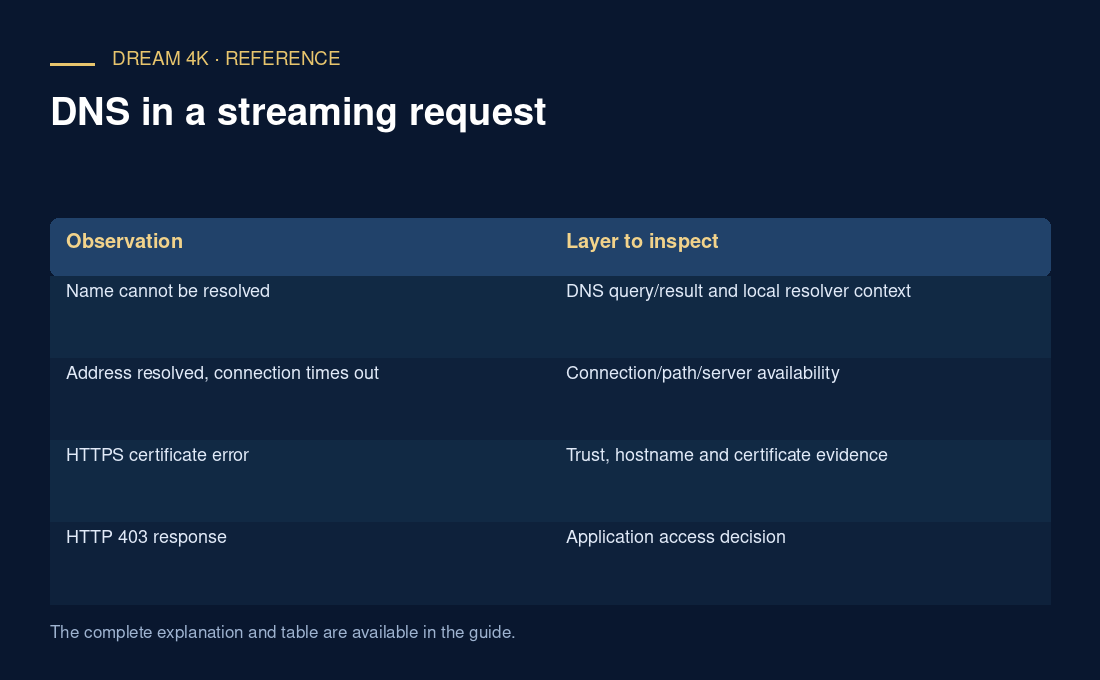
Distinguish resolution from later failures
| Observation | Layer to inspect |
|---|---|
| Name cannot be resolved | DNS query/result and local resolver context |
| Address resolved, connection times out | Connection/path/server availability |
| HTTPS certificate error | Trust, hostname and certificate evidence |
| HTTP 403 response | Application access decision |
| Media downloads but decoder fails | Media format and playback path |
Make controlled changes only when evidence fits
Record the failed hostname, observation time and exact application error without exposing private paths or tokens. If a resolver comparison is appropriate, follow the device/network administrator’s documented method and preserve the original setting. A managed network may require its assigned resolver for internal or policy reasons.
A different resolver can change resolution behavior, but it does not create bandwidth, repair invalid media or grant access to a protected source. Avoid describing any public resolver as a guaranteed speed upgrade for every stream. The result of a comparison should state what name resolved differently and whether that changed the observed request chain.