
In this guide
Identify the declared source and actual outputCheck the chain between player and displayCompare one supported mode and preserve the tradeoffWashed-out or unexpectedly dark HDR playback can involve a mismatch somewhere between the source’s intended image system and the display’s interpretation. It can also reflect mastering, tone mapping or picture settings. The appearance alone does not establish which stage is responsible.
Start with one known permitted item and record the source and output information available. Avoid changing every brightness, contrast and colour control at once.
Identify the declared source and actual output
Record whether the selected media is declared SDR, PQ-based HDR, HLG or another supported form, if diagnostics provide that information. Keep codec and bit depth separate: neither HEVC nor ten-bit alone establishes HDR. Then record the device’s actual output mode and the display’s reported input mode.
In an original hypothetical pipeline, a source intended for HDR is interpreted downstream as SDR without a correct conversion. Raising brightness can make parts of the image lighter while leaving the underlying interpretation wrong. This illustrates a possible mismatch, not a diagnosis of every pale picture.
Check the chain between player and display
A receiver, soundbar or switch can be part of the signal path. Use exact-model documentation for supported formats and settings. If the device offers documented dynamic-range matching, record its state and whether the application supports the expected behavior. Frame-rate matching is another independent control.
A fixed HDR output can also involve conversion of SDR material, depending on the platform. Distinguish that output choice from a native HDR source. If a display briefly blanks during a documented format switch and then plays correctly, that transition differs from persistent incorrect colour or brightness.
Compare one supported mode and preserve the tradeoff
Use a documented reversible comparison with a known SDR item or a supported output choice, keeping other picture processing stable. Record whether the source, output or both changed. Do not call the test isolated if the app also selected a different rendition or codec.
A useful report contains source metadata if known, player version, output mode, connected equipment and the specific visual symptom. It can identify a path-sensitive mismatch for further investigation without claiming measured calibration, peak brightness or universal HDR compatibility. Restore the intended supported configuration after the test rather than using a global picture adjustment to hide an unresolved signal interpretation problem.
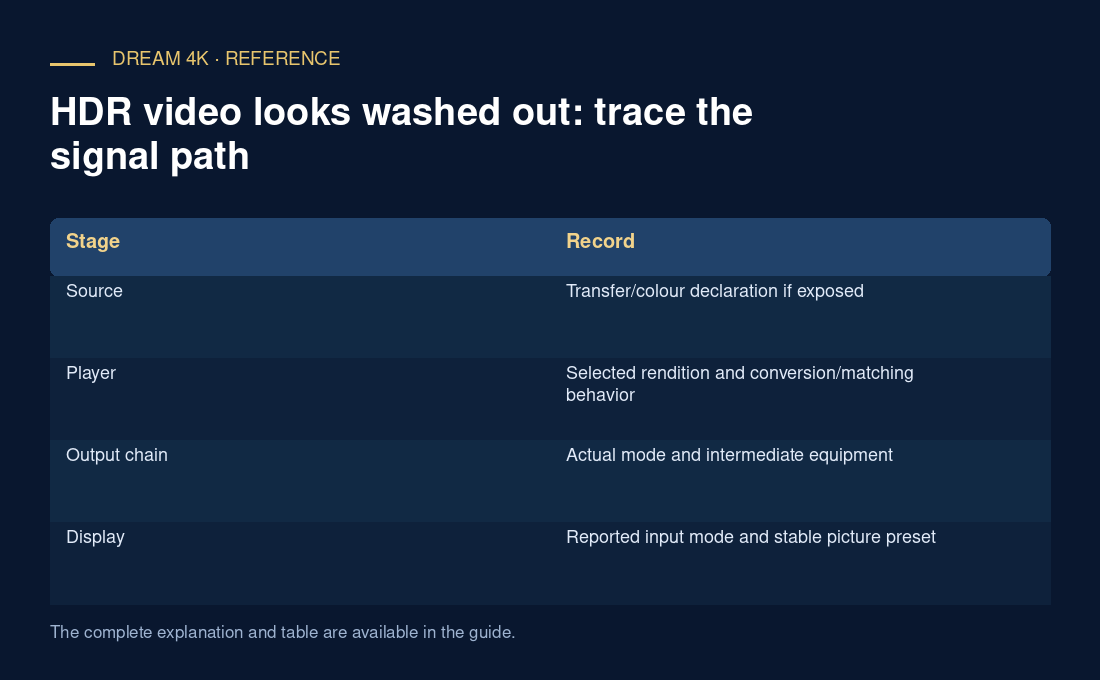
| Stage | Record |
|---|---|
| Source | Transfer/colour declaration if exposed |
| Player | Selected rendition and conversion/matching behavior |
| Output chain | Actual mode and intermediate equipment |
| Display | Reported input mode and stable picture preset |