
In this guide
Identify how the service is fundedSeparate the player from the serviceCompare the complete offerUse price as purchase evidenceInspect content authorisation separatelyMake a decision from the actual use caseFree and paid describe a price, not a complete streaming model. An internet-delivered television service can be funded by advertising, a subscription or another clearly stated arrangement. A player can also be free to install while requiring a separate licence for software features. Start by identifying what is being offered and who supplies the content.
The useful comparison has three parts: funding, the item purchased and authorisation for the intended content and location. A charge, a working stream or a polished app does not answer all three.
Identify how the service is funded
A provider may publish an advertising-funded offer, a paid term or a limited promotional arrangement. Read its own current description. Tubi, for example, explains that advertising funds its free service. That is a concrete funding description from that provider; it does not establish availability everywhere or say anything about a different source loaded into another app. An unexplained free playlist needs its own evidence. So does a paid playlist.
Separate the player from the service
A player licence concerns software under the developer’s terms. A service purchase concerns the provider’s described access term. An app-store account may own the software receipt. Identify each item and merchant before comparing costs. Paying a player developer does not establish that an external source is included. Paying a service seller does not establish a universal software licence. Keep the actual scope of any bundle in writing.
Compare the complete offer
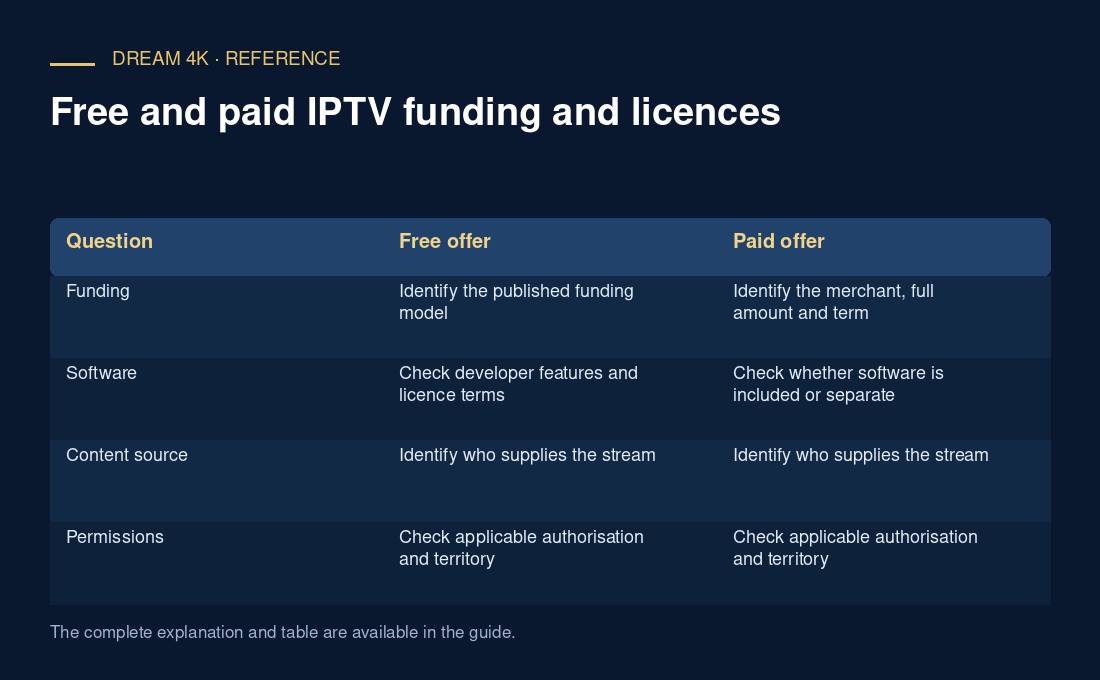
Use a table that leaves unanswered fields visible. Do not fill them from a familiar brand logo or a promise made by an unrelated seller.
| Question | Free offer | Paid offer |
|---|---|---|
| Funding | Identify the published funding model | Identify the merchant, full amount and term |
| Software | Check developer features and licence terms | Check whether software is included or separate |
| Content source | Identify who supplies the stream | Identify who supplies the stream |
| Permissions | Check applicable authorisation and territory | Check applicable authorisation and territory |
| Support and privacy | Read actual contact and data terms | Read actual contact and data terms |
Use price as purchase evidence
Dream’s published service prices are full selected-term totals. For example, USD 49.99 describes the published twelve-month term, not a USD 49.99 monthly-billing offer. That price establishes the commercial description in the current table. It does not prove a title’s availability, content rights, connection allowance or a separate player fee. Ask the responsible seller about material account conditions and preserve its answer with the order.
Inspect content authorisation separately
Copyright licences can be limited by purpose, time and territory, as UK government guidance explains. This is why a receipt alone is incomplete rights evidence. Look for the rights holder or authorised distributor, the official viewing route and terms that cover the intended source and location. A channel logo, reseller dashboard, testimonial or successful playback demonstrates something different from that authorisation. If the evidence remains unclear, use the rights holder’s published route or ask it directly.
Make a decision from the actual use case
Compare the intended title or channel, applicable location, full cost, software requirements and documented support terms. Check optional features such as accessibility or household controls in the exact app’s current documentation rather than assuming every free or paid service behaves alike. Public or business showing can require a different permission scope from private viewing. This overview does not certify a provider’s rights or give a universal legal conclusion; it gives you a way to organise the evidence before a purchase or account change.
Questions about this guide
Does paying for a player prove that its external playlist is authorised?
No. The player purchase and the external content source are separate evidence. Inspect the developer’s software terms and the source’s applicable rights and distribution information. A familiar app or paid feature does not establish permission for every stream it can open.
Can a free stream be authorised?
A rights holder or authorised service can offer content without a direct viewing charge under its published model. Inspect the actual source and applicable terms. The absence of a price is not enough by itself to establish either authorisation or infringement.