
In this guide
Document the competing workloadCompare idle and loaded responsivenessChoose a proportionate next stepA cloud backup or large upload can coincide with video trouble even when the advertised download speed looks generous. The relevant observation is whether that traffic changes the affected device’s delivery deadlines or network responsiveness.
Do not assume every simultaneous upload is the cause. Establish a baseline, change one known workload briefly and compare the same playback conditions as closely as practical.
Document the competing workload
Note which device uploads, whether it uses Wi-Fi or Ethernet, and when the transfer begins. Record the affected player’s connection and the observation time. If a backup application offers a documented pause or rate limit, that is a reversible way to create a comparison without changing router security or stopping unrelated household traffic.
In an original hypothetical observation, playback is steady with the backup paused, segment requests become late during the upload, and they improve when it pauses again. That pattern supports a workload correlation. It does not by itself identify whether the bottleneck is wireless airtime, the upstream link, queueing or another shared resource.
Compare idle and loaded responsiveness
If you use a modest diagnostic probe, keep its destination and method identical across the comparison. Record both response-time behavior and the actual media request/buffer trend. A busy path can sustain substantial throughput while adding queue delay, so “the upload is fast” does not eliminate a responsiveness problem.
Avoid running a full speed test at the same time unless testing that added load is the deliberate experiment. Heavy tests create their own traffic and can obscure whether the backup or the test changed the result.
Choose a proportionate next step
If the correlation repeats, review the backup application’s scheduling/rate controls or the router manufacturer’s documented queue-management options. Record existing settings before making a reversible change. Do not apply a universal shaping percentage or disable protective features based on a generic internet tip.
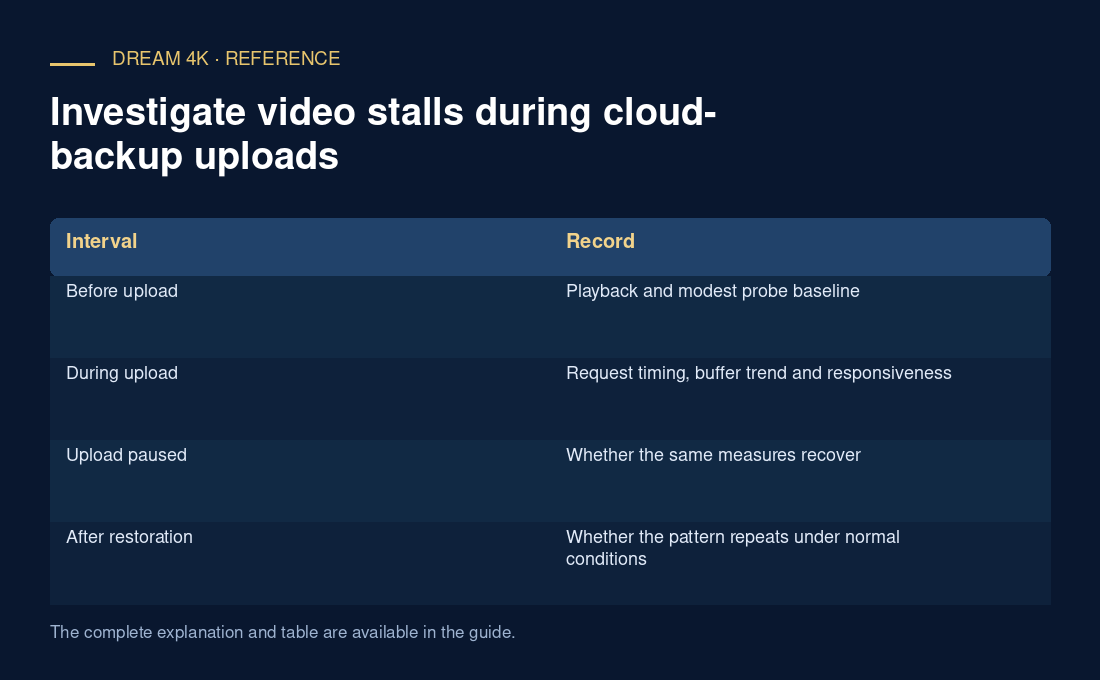
A useful report states the workload, the before/during/after intervals, request timing and buffer behavior. If the comparison does not change playback, retain that negative result and investigate another layer. The purpose is to test one plausible shared-resource explanation, not to make the home network permanently idle.
| Interval | Record |
|---|---|
| Before upload | Playback and modest probe baseline |
| During upload | Request timing, buffer trend and responsiveness |
| Upload paused | Whether the same measures recover |
| After restoration | Whether the pattern repeats under normal conditions |