
In this guide
Record the smallest reproducible caseSeparate application and account stepsTrace delivery before blaming decodingUse buffer and presentation evidence for freezesMake one reversible comparison, then reportWhen IPTV is not working, the most useful first description is what fails: the app will not open, login is rejected, the channel list is empty, one item fails, every item fails, the picture freezes, sound is missing or only the guide is wrong. Those observations point to different stages.
Start with the exact symptom and a short controlled comparison. Changing DNS, reinstalling the player and altering decoder settings together can erase useful evidence while leaving the original cause unknown.
Record the smallest reproducible case
Note the player name/version, device model, connection type, affected item and observation time with timezone. Copy the exact error. If the problem began after a change, record that change without assuming it caused the failure. Preserve account settings before any reset.
Compare one previously working permitted item in the same player. If only one source fails, retain that item-specific scope. If all playback fails but menus load, the successful menu is only partial connectivity evidence: media can use a separate host, request or permission path.
Separate application and account steps
If the app will not launch or its interface fails, use the platform’s documented update/restart process. If login is rejected, check the supplied input format and exact error through the account’s documented route. A player licence, a streaming subscription and content access can be separate things; paying for one does not establish the status of the others.
Do not publish credentials or send private playlist links to public forums. A server response refusing access is not repaired by a picture preset or larger media buffer. Account-specific rules such as simultaneous connections and exact-model compatibility need current first-party confirmation rather than guesses.
Trace delivery before blaming decoding
For HLS, the entry playlist can lead to a selected media playlist, audio resources, initialization information and media segments. The first URL returning 200 does not prove the chain is complete. Where diagnostics exist, identify the earliest failed dependency and distinguish DNS, connection, TLS and HTTP outcomes.
A 403 response indicates refusal of the request, a 404 indicates the requested resource was not found under the server’s response semantics, and a timeout without a response is a different observation. Preserve the code and resource role rather than translating every case to “the server is down.”
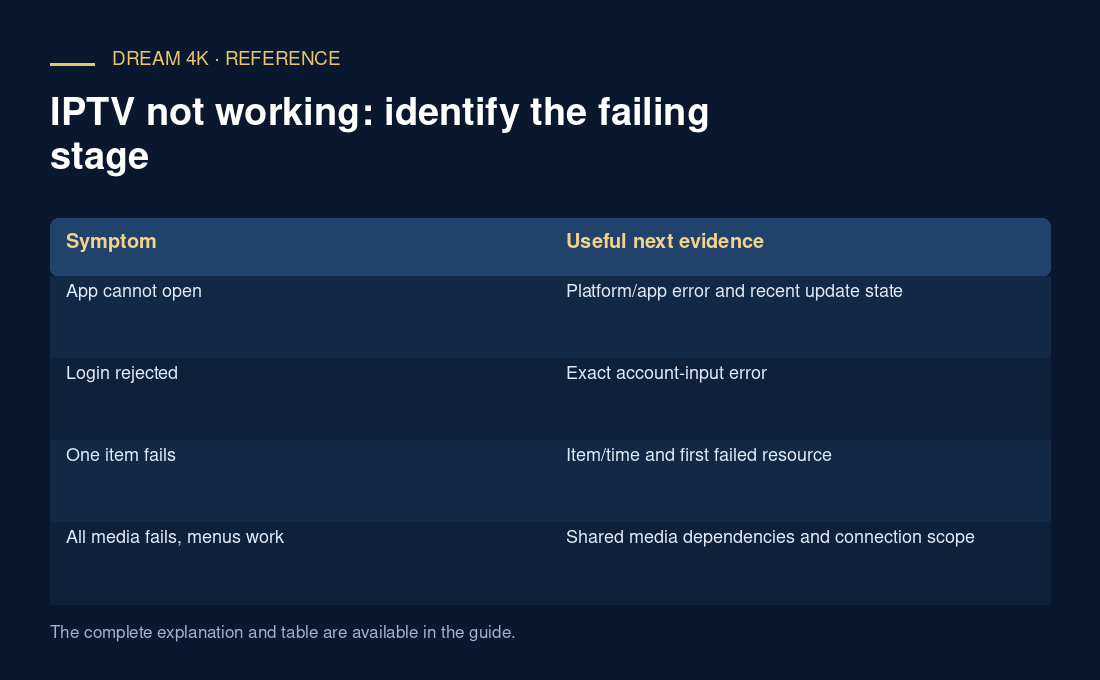
| Symptom | Useful next evidence |
|---|---|
| App cannot open | Platform/app error and recent update state |
| Login rejected | Exact account-input error |
| One item fails | Item/time and first failed resource |
| All media fails, menus work | Shared media dependencies and connection scope |
| Picture with no sound | Selected audio and output path |
| Guide wrong, video works | EPG coverage/mapping/time interpretation |
Use buffer and presentation evidence for freezes
If requests become late and the playable buffer drains, investigate delivery deadlines and shared network load. If substantial media remains buffered while frames drop or decoding fails, inspect the selected configuration and presentation path. A successful modest codec example does not establish every high-resolution/high-frame-rate configuration.
An original hypothetical session downloads the playlist and initialization data, then receives 404 for the first segment. Another downloads the segment successfully but reports a decode error. Both show no first picture, yet the first investigation is resource availability and the second requires media/decoder evidence.
Make one reversible comparison, then report
A supported wired comparison can help test a wireless hypothesis. An offered lower rendition can test configuration sensitivity. A different supported audio option can narrow a sound problem. Document which variable changed, keep conditions close and restore settings where appropriate.
A useful report states the action, expected result, actual result, repetition, player/device version and earliest failed stage. Include a small redacted excerpt rather than a full private log. This approach produces an actionable account even if the final cause needs provider or player investigation; it avoids unsupported promises that one generic fix repairs every IPTV failure.
- Describe the exact symptom and one affected item.
- Record time, device/player and error.
- Find the earliest failed stage.
- Change one justified variable.
- Share a minimal redacted report through the documented support route.