
In this guide
Distinguish a drained buffer from other freezesCompare media duration with delivery timeMatch the network comparison to the affected pathCheck competing traffic and sensible player choicesKeep the result concreteRepeated pauses are often described as buffering, but the visible spinner does not identify the cause. A player can wait for late media, fail to retrieve a segment, encounter a decoder problem or resume outside a live window. The useful question is what happened just before the pause.
Begin with one affected programme, a recorded time and the player’s available diagnostics. The aim is to find a justified correction, not to promise that a universal speed target, DNS change or buffer slider fixes every stream.
Distinguish a drained buffer from other freezes
A delivery-driven underrun occurs when needed playable media is not available in time. A decoder or renderer can also stop producing smooth pictures while data remains buffered. Audio continuing, dropped-frame counters and exact player errors can help distinguish those patterns.
If the problem occurs only after a long live pause, compare the old position with the current live window. If it happens at the same programme boundary, preserve discontinuity and initialization context. These patterns deserve their own evidence rather than an assumption of low broadband speed.
Compare media duration with delivery time
Record several adjacent segment requests where the player exposes them. Include media duration, payload size, transfer time and buffer trend. A six-second segment taking eight seconds repeatedly consumes buffered time in a simplified sequential model; one late segment may be absorbed if enough media is already held.
An original hypothetical sequence delivers eighteen seconds of media in nineteen seconds of sequential transfer. With twelve seconds initially buffered and continuous playback, the simplified buffer ends at eleven seconds. Real players add concurrency, separate tracks and scheduling, so preserve those limitations instead of turning the example into a service benchmark.
Match the network comparison to the affected path
A speed test on a nearby laptop at another time does not measure a television’s wireless link or the media endpoint during the freeze. Record device, connection, destination and interval. Avoid adding heavy test traffic while trying to passively observe an already congested connection.
If practical, compare the affected device over a supported wired link close in time. If wireless delivery changes, investigate placement, airtime and access-point conditions using manufacturer guidance. If it does not, retain that result without claiming the test eliminated every local or upstream cause.
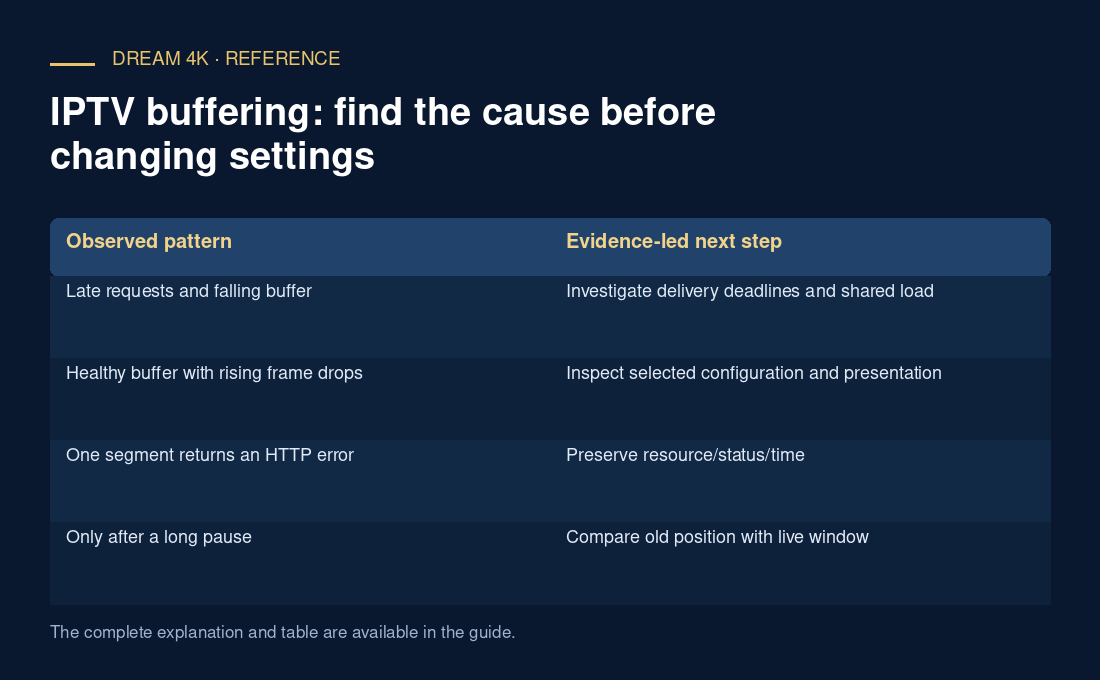
| Observed pattern | Evidence-led next step |
|---|---|
| Late requests and falling buffer | Investigate delivery deadlines and shared load |
| Healthy buffer with rising frame drops | Inspect selected configuration and presentation |
| One segment returns an HTTP error | Preserve resource/status/time |
| Only after a long pause | Compare old position with live window |
| Only during an upload | Use a before/during/after workload comparison |
Check competing traffic and sensible player choices
Cloud backups and uploads can change queue delay or shared wireless conditions. A documented temporary pause or rate limit on one known workload is a reversible comparison. Do not disable security settings or apply random MTU/DNS/decoder changes as a bundle.
If the player offers automatic rendition selection, note whether a manual quality cap or data-saving preference is active. A lower supported rendition may maintain continuity under current conditions, but its success does not by itself identify the original bottleneck. Record all changed codec, frame-rate and resolution characteristics.
Keep the result concrete
After one justified change, observe the same measures and record whether the pattern repeats. Preserve the original state and restore temporary diagnostic changes. Avoid repeated app resets before saving the error and request context.
A useful report says which item paused, when, how segment timing and buffer behaved, what network/load conditions applied and what one comparison changed. That evidence can guide a source, network or player investigation. It does not require claiming personal performance tests, a fixed minimum for every resolution or a guaranteed “zero buffering” service.
- Record the pause and its exact context.
- Check buffer, requests and presentation separately.
- Compare the affected path under one controlled change.
- Verify the result with the same evidence.
- Report unresolved facts without inventing a cause.