
In this guide
Convert one timestamp by handInspect each adjustment layerVerify a second date or boundaryA guide displaced by an exact number of hours often suggests a timezone or manual-shift question, but the number alone does not identify the cause. The source could be explicit UTC, an offset could be ignored, or a correct offset could be applied twice.
Choose one programme whose actual scheduled time is independently known. Preserve its original XMLTV timestamp and the player’s displayed result before changing settings.
Convert one timestamp by hand
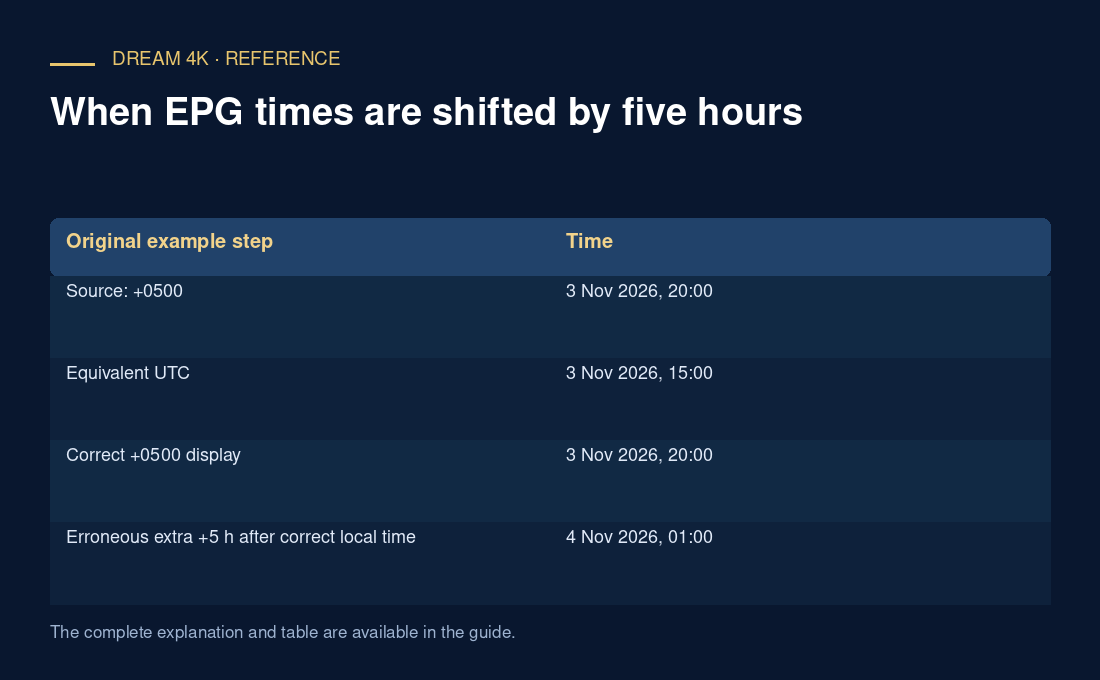
Use the source offset as part of the represented instant. In an original hypothetical example, 20261103200000 +0500 is 20:00 at UTC+05:00 on 3 November 2026. Subtracting five hours gives 15:00 UTC. A display at UTC+05:00 should then show 20:00, not 01:00 the following day.
If a player treats the already offset timestamp as UTC and adds five hours again, it can produce that extra shift. This is one possible mechanism illustrated by the arithmetic, not a diagnosis of any specific application.
Inspect each adjustment layer
Record the device time zone, player guide time zone, importer interpretation and any manual per-guide or per-channel offset. Do not change them all at once. If one channel differs while others are correct, first check whether its guide identity belongs to a different regional or delayed feed.
The XMLTV DTD assumes UTC when no explicit timezone is supplied. A source that omits an offset while intending local time can therefore be ambiguous to a viewer even though the DTD’s interpretation is defined. Preserve the exact original text rather than describing it loosely as “local time.”
Verify a second date or boundary
After a reversible adjustment, check another known programme and a time near midnight if relevant. Calendar-date changes can hide entries under the previous or next day. For locations with daylight-saving changes, use the applicable date’s zone rule rather than a permanent fixed offset.
A useful report includes source timestamp, expected local time, actual displayed time, all active manual offsets and the player version. If no matching programme record exists, a timezone correction cannot create it. The result should identify the observed conversion mismatch while keeping missing coverage and wrong-feed mapping as separate questions.
| Original example step | Time |
|---|---|
| Source: +0500 | 3 Nov 2026, 20:00 |
| Equivalent UTC | 3 Nov 2026, 15:00 |
| Correct +0500 display | 3 Nov 2026, 20:00 |
| Erroneous extra +5 h after correct local time | 4 Nov 2026, 01:00 |