
In this guide
Identify the relevant settingsConsider the audienceUse a supported private entry methodRecord the useful preferenceAccessibility features can make a shared television easier to use, but spoken output may reveal information to people nearby. Review the platform’s documented speech and password settings before entering account secrets in a shared room. Keep accessibility enabled in a way that supports the user’s actual needs.
Identify the relevant settings
Google TV’s accessibility guidance describes TalkBack configuration, including spoken-password settings, along with text-to-speech controls. Use the current guide for the installed platform. Do not assume another device or player offers identical options, or that a device-level preference governs every app.
Consider the audience
A support call, visitor or screen recording may capture spoken account labels or secret entry. Decide which information the situation requires. A non-secret profile nickname can help navigation without revealing a username or complete connection address. Keep passwords and recovery material out of ordinary spoken support explanations.
Use a supported private entry method
Where the platform supports an appropriate audio route or entry option, follow its documentation and the user’s preference. Do not disable accessibility in a way that prevents the account owner from completing the task independently. If the available control is inadequate, ask the platform or developer for its supported alternative.
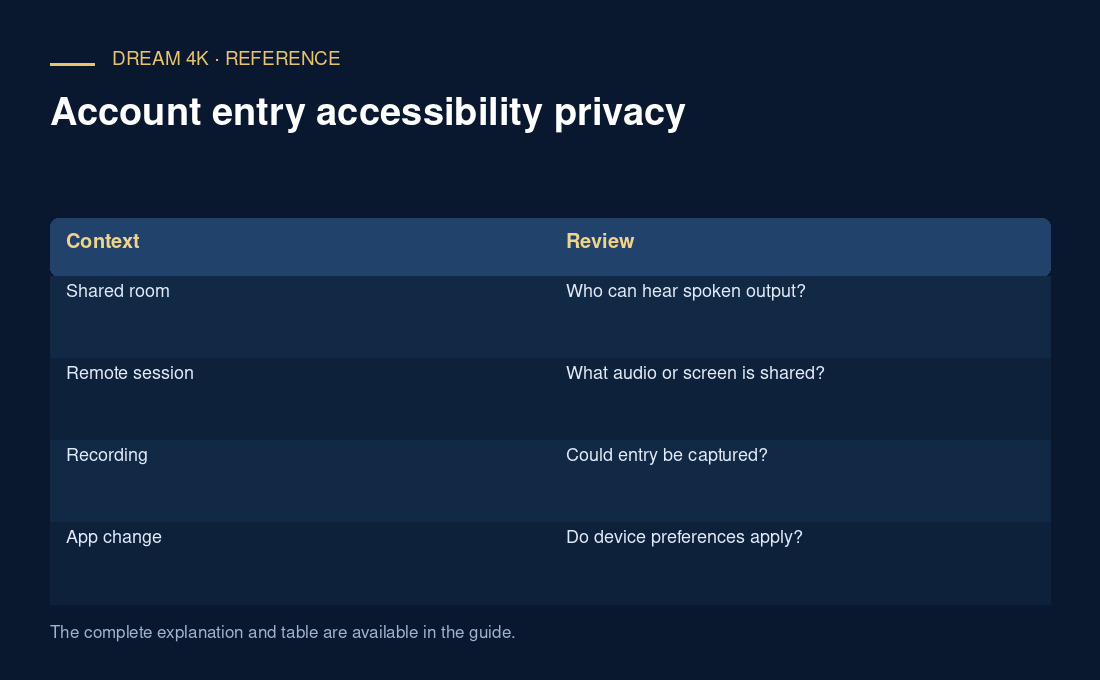
| Context | Review |
|---|---|
| Shared room | Who can hear spoken output? |
| Remote session | What audio or screen is shared? |
| Recording | Could entry be captured? |
| App change | Do device preferences apply? |
Record the useful preference
A support note can say that written steps or a particular assistive method helps the customer, without storing a diagnosis or the account secret. Review the setting after a meaningful device or app change. This guide identifies a privacy consideration; it does not claim a universal screen-reader behaviour or certify any app’s accessibility.
Questions about this guide
Should I always turn off spoken output when entering accounts?
No universal setting fits every user or device. Use the documented privacy options and a supported method that preserves the user’s access. The aim is private, usable entry rather than removing an accessibility feature the person needs.