
In this guide
Build a track-level comparisonClassify the failure before choosing a conversionMake the smallest justified testWhen one MP4 plays and another does not, the shared extension is only a starting clue. MP4 is a container family. Its tracks can use different codecs, profiles, levels, bit depths, channel layouts and timing structures.
Use media you are entitled to inspect. The goal is to compare the actual track descriptions and failure stage, not to assume the unsuccessful file is corrupt or that the device cannot play MP4 at all.
Build a track-level comparison
Record each file’s video and audio codec descriptions, dimensions, frame rate and other available configuration metadata. Include whether the file is fragmented and whether initialization information is separate. Use a trusted local inspection tool or the player’s diagnostics rather than uploading private media to an unknown analysis service.
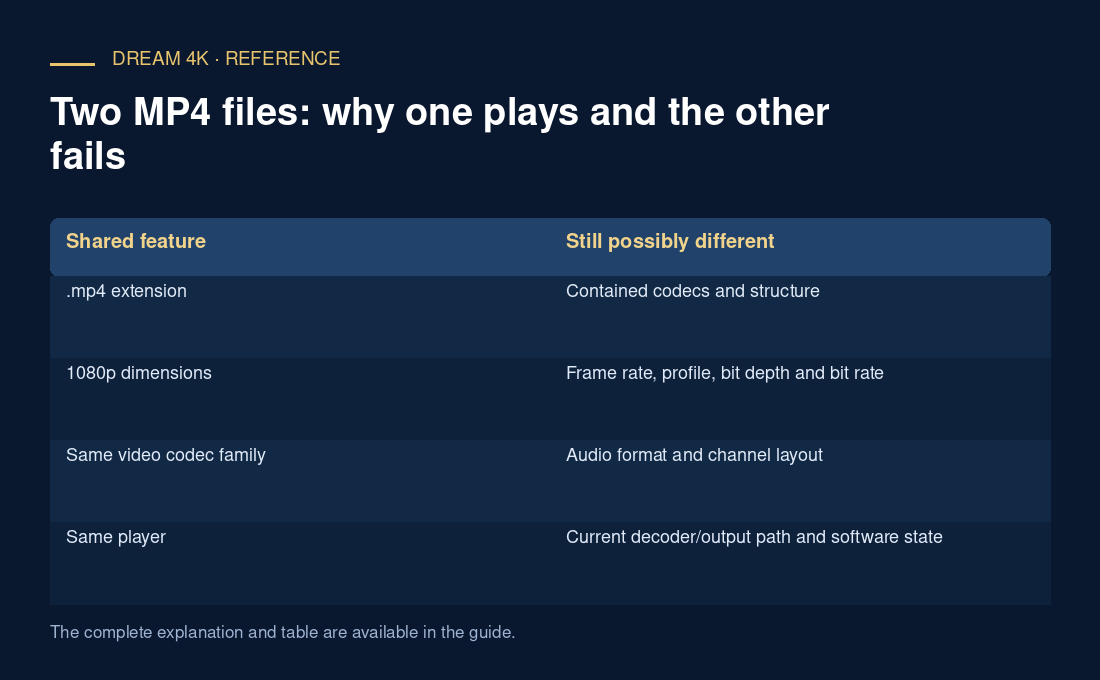
In an original hypothetical pair, both files have .mp4 names and 1920×1080 dimensions. One contains a supported video/audio combination; the other uses a different audio codec. Picture without sound can therefore be an audio-path question even though the visible container and resolution match.
Classify the failure before choosing a conversion
If the player cannot parse the container, investigate structure and packaging. If it identifies tracks but fails to initialize a decoder, compare the exact sample configuration with the documented decoder path. If requests fail before media arrives, a conversion suggestion does not address the observed delivery problem.
A remux preserves encoded samples while changing their packaging. It can help only when the actual issue is compatible with that change. Re-encoding changes samples and can introduce quality loss or processing cost. Simply renaming .mp4 to another suffix does not perform either operation.
Make the smallest justified test
Where you control the media and have permission to process it, choose a short representative excerpt and a documented target format. Keep the original file and record whether the test changes container only or re-encodes tracks. A result is meaningful only if you know which variable changed.
For a provider-delivered stream, report the differing track metadata and exact player error instead of modifying protected or inaccessible content. A useful conclusion says which file/configuration worked and which failed under a stated player version. It should not generalize that observation to every MP4, every item in a catalogue or every device with the same logo.
| Shared feature | Still possibly different |
|---|---|
| .mp4 extension | Contained codecs and structure |
| 1080p dimensions | Frame rate, profile, bit depth and bit rate |
| Same video codec family | Audio format and channel layout |
| Same player | Current decoder/output path and software state |